Assessment 3 Information
Your Task
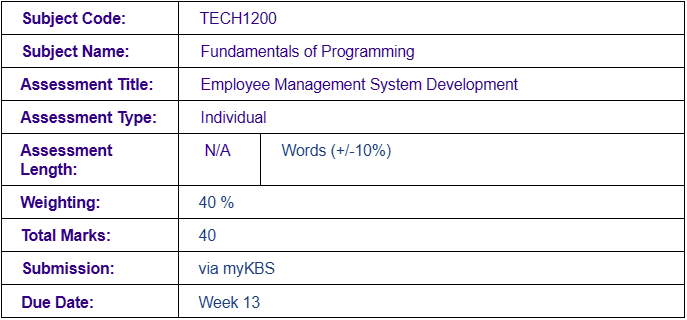
>You will develop an Employee Management System using Python. This system will require handling multiple data sources and performing more complex data manipulation tasks, while still focusing on Classes, File Handling, and Exception Handling.
You are allowed and encouraged to use ChatGPT for assistance but must complete the coding independently. Document your interactions with ChatGPT and explain how its suggestions helped or influenced your solution.
Assessment Description
The Employee Management System project simulates a real-world scenario where a small or medium-sized business needs to manage employee data, reflecting standard business practices. The system should incorporate object-oriented programming (OOP) principles such as classes, file handling for data persistence, and error handling. The project is designed to reinforce key programming skills in Python while ensuring students understand how to structure a solution for a typical business case involving employee management. Through the application of OOP, students will learn how to design and implement reusable and scalable code.
Furthermore, the system incorporates multiple data files file-handling techniques, allowing data to be stored and retrieved, which mirrors the way real-world applications manage information. Exception handling ensures the robustness of the program, avoiding crashes when invalid inputs or unforeseen issues occur. In this project, ChatGPT can be used as an assistant to refine design logic, enhance code quality, and manage exceptions, but students are responsible for writing the code themselves.
Requirements
Part 1: Code:
Your task is to create an Employee Management System that covers the following requirements:
• Class and Behaviours
⮚ Create a class called Employee with the following parameters:
▪ Private instance attributes: name, age, position, and salary.
▪ Public instance attributes: department, location.
⮚ Implement the following behaviours:
▪ Parameterised Constructor: Initialise at least 4 employee objects with the attributes mentioned above and write them into a file (.txt, .csv, or .json). Call the file Current_Employees.
▪ Add Employee: Prompt the user to enter employee details and write the data to the Current_Employees file. Add validation checks to ensure no employee with the same name or position is added twice.
▪ View All Employees: Read from the Current_Employees file and display all employee records.
▪ Update Employee Details: Modify an employee's details in the Current_Employees file based on the user's input.
▪ Delete Employee: Remove an employee's details from the Current_Employees file based on the user's input.
▪ Search Employee: Search for an employee by their name in the Current_Employees file based on the user's input.
▪ Sort Employees: Sort and display the employees based on salary and position in the Current_Employees file based on the user's input.
⮚ Implement a menu in main() that allows users to select different options, such as adding a new employee, viewing all employees, updating employee details, deleting an employee, searching for an employee, and sorting the employees. This should be presented to the user when the code runs.
⮚ ChatGPT Interaction: Use ChatGPT to help design the logic for your class and behaviours. Ask for feedback on improving your approach. Document this interaction.
• File Handling
⮚ The system must use file handling to persist employee data. Each method should read from or write to the Current_Employees file as required. Ensure proper handling of file operations with error checking and exception handling.
⮚ ChatGPT Interaction: Ask ChatGPT for assistance in designing your file reading with error checking and exception handling. Document this interaction.
• Exception Handling
⮚ Implement appropriate exception handling to manage potential errors, such as:
▪ Invalid input from the user.
▪ File not found errors.
⮚ Data type mismatches (e.g., age must be an integer, salary must be a float). ⮚ ChatGPT Interaction: Ask ChatGPT for assistance in exception handling. Document this interaction.
Part 2: Video:
As part of your assessment, you are required to create a Code Explanation Video in which you will explain the logic and reasoning behind your code. This video will demonstrate your understanding of the programming concepts you have applied in your Employee Management System and allow you to articulate your thought process clearly. Use the following guidelines for the coding explanation video:
• Purpose:
⮚ The video should focus on explaining the logic and reasoning behind your code, highlighting key decisions, programming constructs, and how different components of your code work together to achieve overall functionality.
• Content to Cover:
⮚ Provide a brief overview of the Employee Management System, including its main features and purpose.
⮚ Highlight key sections of your code, such as control flow, conditional logic, functions, loops, and data structures (lists, dictionaries) etc. Explain how these sections contribute to the overall system functionality.
⮚ Discuss the rationale behind your choice of algorithms, data structures, and code organisation. Justify why you used specific methods, libraries, or design approaches. ⮚ Identify any challenges you encountered while coding and explain how you resolved them. This could include debugging processes, optimising code, or refining logic with ChatGPT feedback.
⮚ Mention any improvements you made based on testing or feedback and suggest areas for future enhancement.
• Requirements:
⮚ The video should be between 5 to 7 minutes in length.
⮚ Use screen recording software to showcase your code directly while you explain it. Ensure your screen and audio are clear and your video is turned on.
NOTE 1:
Any deviation from assessment guideline or use of very advanced concept without approval of class lecturer or subject coordination could result in academic penalty or case referred to our Academic Integrity Team.
NOTE 2:
You are encouraged to use ChatGPT and other generative AI tools to assist with specific tasks such as refining logic, providing guidance on error handling, and offering suggestions for file management. However, the use of ChatGPT or any generative AI for direct code generation is strictly prohibited. This assessment is designed to evaluate your programming skills, and all coding must be completed independently. Any attempt to use AI-generated code will be considered a violation of the assessment guidelines and will result in academic penalties. You must provide us with full screenshots of your interaction. Any attempt to provide only truncatd or partial interactions can result in academic penalty or case referred to our Academic Integrity Team.
This assessment aims to achieve the following subject learning outcomes:
- LO1: Interpret simple program specifications.
- LO4: Use an integrated development environment to develop, debug and test a solution written in a programming language.
- LO5: Use a programming language to read and write data to a persistent storage.
Assessment Instructions
1. Develop a clear structure for your Employee Management System, ensuring that all code is organised logically using functions and external libraries.
2. The program must have user interactivity and choices so that users can use the program for as long as they want.
3. The program must follow proper coding standards such as including appropriate comments, be clearly organised, code must be easy to read and use appropriate variable names.
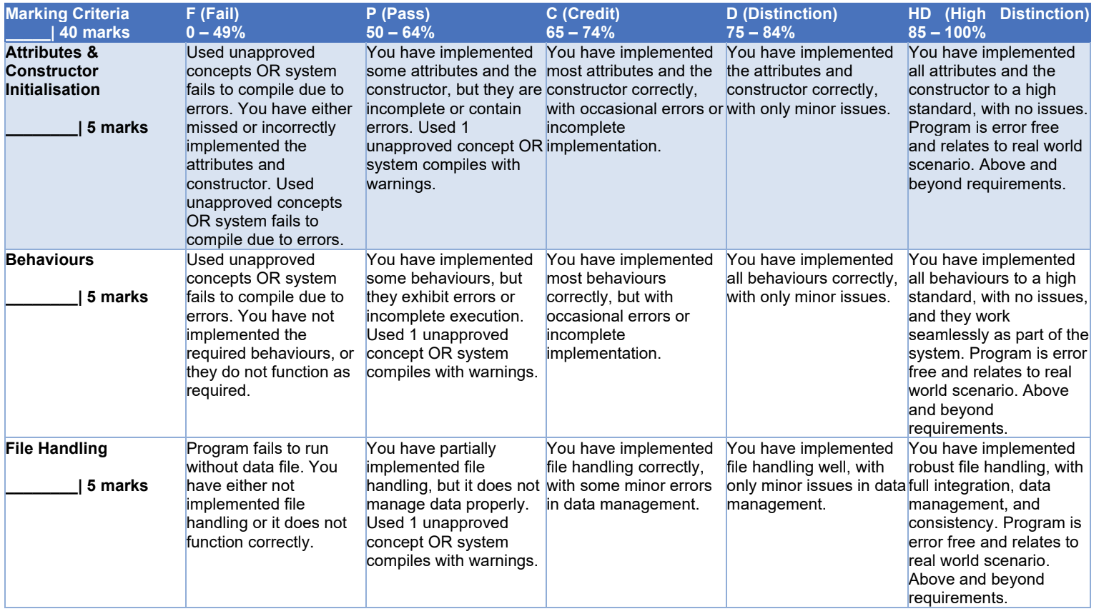
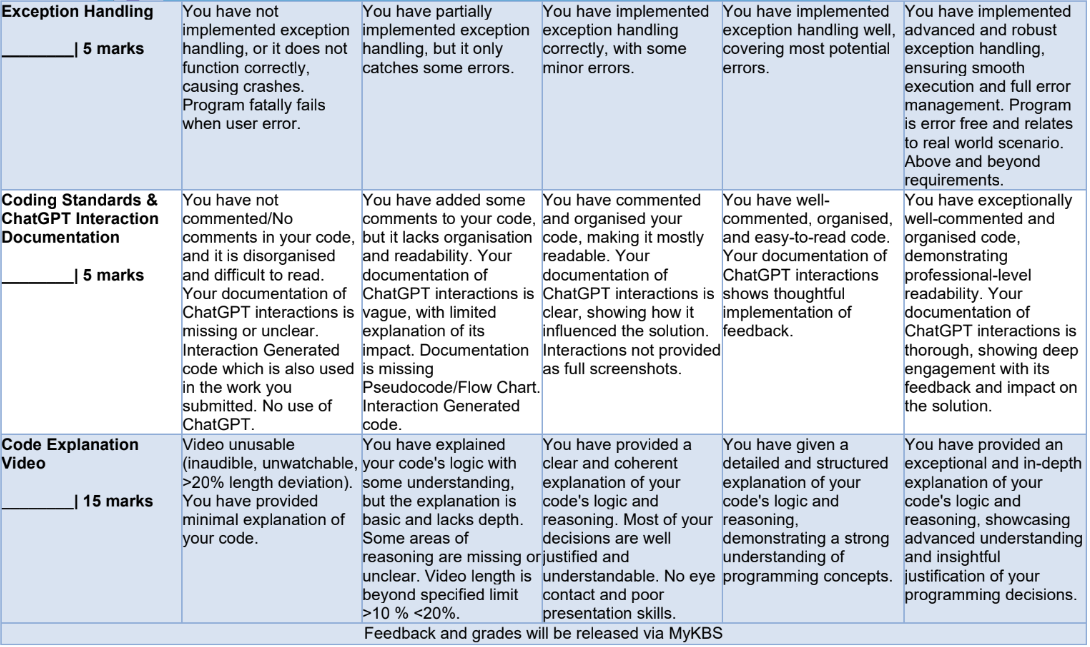
4. Include a transcript of all your interactions with ChatGPT. Ensure the transcript highlights the questions asked, the feedback received, and how you implemented this feedback. Document this in a Word file in the form of screenshots.
5. Include a transcript of all your interactions with ChatGPT. Ensure the transcript highlights the questions asked, the feedback received, and how you implemented this feedback. Document this in a Word file in the form of screenshots of full interaction.
6. Your video will be assessed based on your ability to clearly and accurately explain your code, demonstrate a sound understanding of programming concepts, and justify your coding decisions.
7. Any deviation from assessment guidelines will be considered as breach of contract and may result in academic penalty or case referred to our Academic Integrity Team.
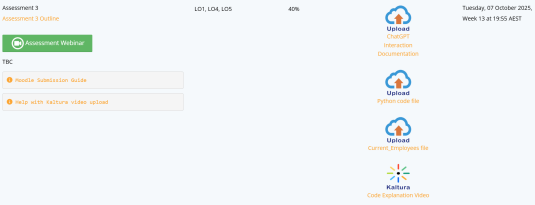
8. You are only allowed to submit 4 files. 1 must be your Python code file in '. PY' format, and other file must be either MS Word or PDF file format, where you will post your ChatGPT interaction screenshots. The final file will be your video in a commonly supported format (e.g., MP4, AVI, MOV). The final file will be your Current_Employees file.
- NOTE: Please refer to screenshot below showing 4 separate icons and description to submit 4 separate files respectively.
9. Submit your files via myKBS submission platform by the due date.
10.Please refer to the assessment marking guide to assist you in completing all the assessment criteria.
Important Study Information
Academic Integrity and Conduct Policy
KBS values academic integrity. All students must understand the meaning and consequences of cheating, plagiarism and other academic offences under the Academic Integrity and Conduct Policy.
Please read the policy to learn the answers to these questions:
- • What is academic integrity and misconduct?
- • What are the penalties for academic misconduct?
- • How can I appeal my grade?
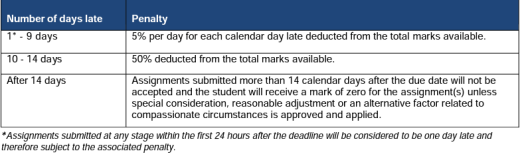
Late submission of assignments (within the Assessment Policy)
Length Limits for Assessments
Penalties may be applied for assessment submissions that exceed prescribed limits
Study Assistance
Students may seek study assistance from their local Academic Learning Advisor or refer to the resources on the MyKBS Academic Success Centre page. Further details can be accessed at
Submission Requirements
All assessments including draft copies must be written and submitted in English. The use of translation tools is not permitted.
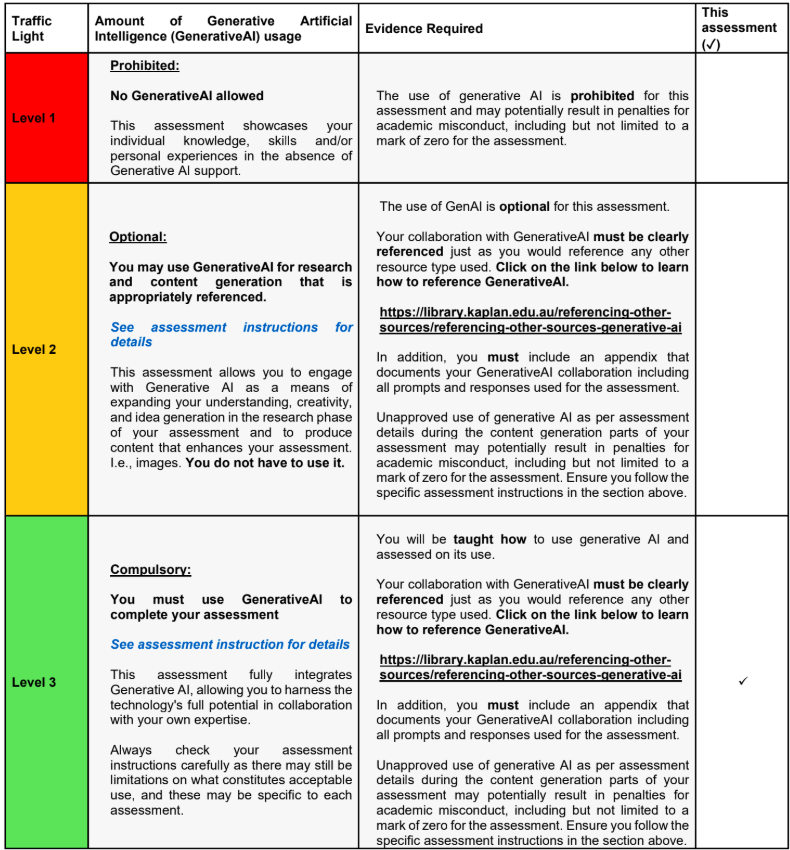
Generative AI Traffic Lights
Please see the level of Generative AI that this assessment has been designed to accept:
Assessment Marking Guide